Speak Spanish, type English with voice dictation
If Spanish is your first language and English is your working language, an email takes much longer to write than to say. You know what you mean; finding the English words, one at a time, is the slow part.
Lispr lets you dictate in Spanish and type in English. You hold the dictation key together with the translate key, say the message in Spanish, and release. The English version appears at your cursor, in the email or chat you already have open. It works on Mac and Windows.
How the flow works
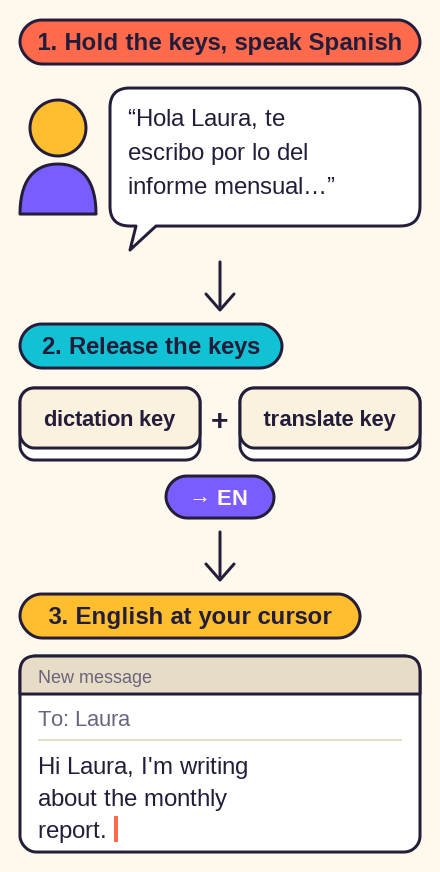
An example email
Here is one email, start to finish. It is an example written to show the workflow; Lispr's real output may word it differently.
Say you need the October sales figures from a colleague before you can finish a report. You click into a new email to Laura, hold the keys and speak as you would out loud:
Hola Laura, te escribo por lo del informe mensual. Ya tengo casi todos los datos, pero me falta la parte de ventas de octubre. ¿Me la puedes mandar antes del jueves? Así lo termino el viernes y te lo paso para que lo revises. Gracias, un saludo.
You release the keys, and this English email appears in the message body:
Hi Laura, I'm writing about the monthly report. I have almost all the data, but I'm still missing the October sales section. Could you send it to me before Thursday? That way I can finish the report on Friday and send it over for you to review. Thanks, and best regards.
You read it once. In the Spanish, "la" (feminine) points to la parte de ventas and "lo" (masculine) to el informe. English uses "it" for both, so check that each "it" points where you meant. Here the translation names the report, so the meaning holds.
What to check before you send
Translation gets the meaning across, but some words need your eyes every time.
Start with names. People's names, company names and place names can come back misspelled, or now and then translated. Add the ones you use often to Lispr's custom vocabulary, which stays on your device, to help Lispr recognize them.
Product and work terms come next. An internal project name or a technical term may get a literal translation. If your team says "the Q4 deck" in English, say "the Q4 deck" in your Spanish sentence too.
Idioms need a look as well. "Hay que ponerse las pilas" (literally "we have to put our batteries in") means "we need to step it up", and a translation can keep the batteries and lose the meaning. Spanish work emails also often close more warmly than English ones, so check whether a closing like "un abrazo" came out as something you would write to that person in English.
Always read a translated email before you send it.
Setting it up
Choose English as a target language once, and Lispr remembers it. On a Mac you then hold the dictation key and the translate key for that language; on Windows you hold the right Ctrl key and add the key the Lispr hub shows next to English. How Lispr translates as you dictate covers the keys, the two language slots and the settings in full.
Not sure whether to translate at all, or just speak English? Voice to text for non-native English speakers compares the two approaches and when each one fits.
Try it with your next email
Spanish to English voice typing is part of Lispr's Free plan: 60 dictation minutes a week, no sign-up. Download Lispr for Mac or Windows, set English as your target, and dictate your next work email in Spanish.